
Smart Lock with Alexa & Google Home Remote Access: Complete Buying Guide 2024
Imagine unlocking your front door with a voice command while your hands are full with groceries, or granting temporary access to a contractor from anywhere in the world. Smart locks with Alexa and Google Home integration have transformed how homeowners control entry to their homes. A smart lock with Alexa and Google Home remote access combines physical security with digital convenience, allowing you to lock and unlock your door from your smartphone, authorize guests with temporary codes, and monitor access activity in real-time. Whether you're upgrading an older home or outfitting a new property, understanding the key features and top options available will help you choose the perfect smart lock that fits your lifestyle, budget, and smart home ecosystem. In this guide, we'll walk you through the best-performing models, essential buying criteria, and practical setup advice to get you started.
Our Top Picks for Smart Locks with Alexa & Google Home Remote Access
Below are the smartest, most reliable smart locks that deliver genuine voice control, remote access, and seamless integration with Alexa and Google Assistant:
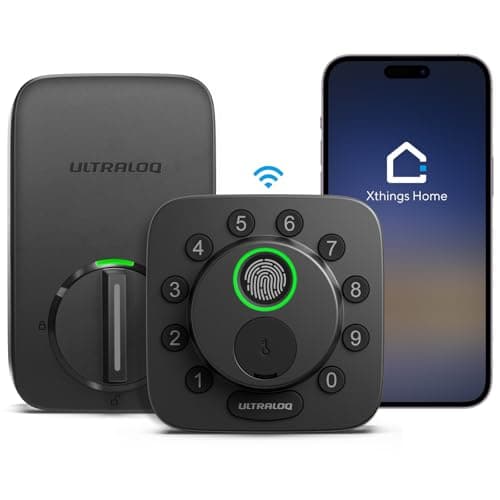
ULTRALOQ
ULTRALOQ Bolt SE Wi-Fi Smart Lock, Matter Over Thread, App Remote Access | Works with Apple Home, Alexa, Google, Smart Door Locks for Front Door with Fingerprint ID, App, Code, Auto Lock, Deadbolt
- 7 in 1 Keyless Entry Door Lock: Fingerprint ID(stores up to 50 fingerprints) + Passcodes(up to 50) + Smartphone App(compatible with Android and iOS) + Web Portal + EKey / Code Sharing + Voice Control with Siri, Alexa or Google Assistant + 2 Mechanical Keys
- App Control via Built-in WiFi: Remotely lock, unlock, and manage your smart lock from anywhere. Share permanent, scheduled, or temporary eKeys and passcodes with family, guests, or service providers. Manage up to 50 fingerprints and 50 access codes, view activity history, and receive real-time notifications—all without a hub. Supports 2.4 GHz Wi-Fi only. For optimal connectivity, keep your router within 70 ft of the lock.
- Remote Access via Matter over Thread: Remotely lock, unlock, and manage your smart lock through Apple Home or other Matter-compatible apps. Enjoy simple setup, real-time notifications, event history, and secure access management—all from your smartphone. Requires a compatible Matter over Thread hub (Thread Border Router).
- Effortless Matter Smart Home Integration: Ultraloq matter smart lock seamlessly integrates with all matter-enabled ecosystems. Voice control with Siri, Alexa and Google Assistant. It can be used to automate your smart home by pairing multiple matter-enabled devices through the one app. No more compatibility headaches. Requires a compatible Matter over Thread hub (Thread Border Router).
* As an Amazon Associate we earn from qualifying purchases.
The ULTRALOQ Bolt SE stands out as the most future-proof option, featuring built-in WiFi, Matter over Thread support, and compatibility with Apple Home, Alexa, and Google Assistant. With a remarkable 18-month battery life, 7-in-1 keyless entry (fingerprint, passcodes, app, eKey sharing, voice control, and two mechanical keys), and the ability to manage up to 50 fingerprints and 50 access codes remotely, it's the ideal choice for tech enthusiasts who want cutting-edge smart home integration and long intervals between battery replacements.
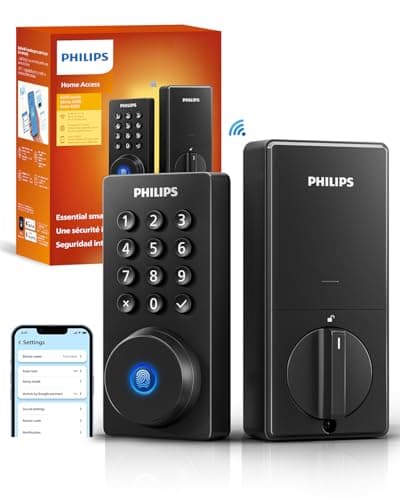
Philips
Philips Wi-Fi Smart Deadbolt Lock, Keyless Entry Door Locks for Front Door | Code / Fingerprint / APP Unlock, Remote Access, Alexa Google Voice Unlock, Auto Lock, Built in WiF, Backlit Touchscreen
- 𝐅𝐥𝐞𝐱𝐢𝐛𝐥𝐞 𝐖𝐚𝐲𝐬 𝐭𝐨 𝐔𝐧𝐥𝐨𝐜𝐤: Unlock the way you want: app, passcode, fingerprint, physical key, or voice via Alexa/Google Assistant. Everyone in the family can choose what works best — convenience meets flexibility. Batteries are not included.
- 𝐔𝐧𝐥𝐨𝐜𝐤 𝐅𝐫𝐨𝐦 𝐀𝐧𝐲𝐰𝐡𝐞𝐫𝐞: Built-in Wi-Fi lets you lock and unlock your door remotely anytime, anywhere from your smartphone — no extra hub needed. Stay connected and in control, even when you’re at work or on vacation. Only support 2.4Ghz network. Keep the router and lock with 65ft for better remote control.
- 𝗩𝗼𝗶𝗰𝗲 𝗖𝗼𝗻𝘁𝗿𝗼𝗹 𝗥𝗲𝗮𝗱𝘆: Pair with Alexa or Google Assistant to unlock or lock with your voice. Great for when your hands are full or you're relaxing at home and still welcome who’s at the door. Note: Please log in to your own Google or Alexa account first before use Voice Control and make sure your network connection is stable.
- 𝗬𝗼𝘂𝗿 𝗙𝗶𝗻𝗴𝗲𝗿𝘀 𝗶𝘀 𝗬𝗼𝘂𝗿 𝗞𝗲𝘆: Just one touch unlocks the door instantly. No need to search for keys — Your fingers is your keys, perfect for busy mornings. Philips wifi lock store multiple prints for easy family access.
* As an Amazon Associate we earn from qualifying purchases.
The Philips WiFi Door Lock delivers outstanding value with built-in WiFi, no hub required, and flexible unlocking options including app, fingerprint, passcode, and voice commands via Alexa or Google Assistant. Its ability to create up to 100 custom passcodes and support for one-time or scheduled codes makes it perfect for families and property managers who need granular access control without complexity.
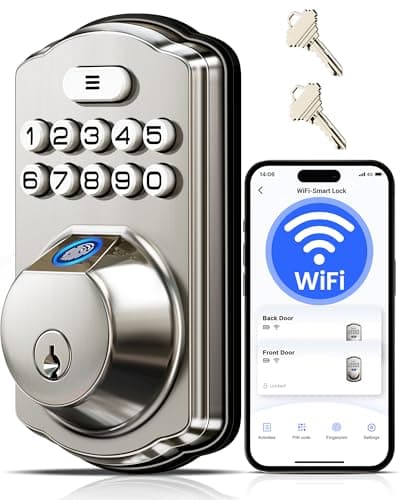
Veise
Veise VE012W WiFi Fingerprint Smart Lock for Front Door, Satin Nickel
- 6-in-1 Keyless Entry: Unlock via the app, fingerprint (stores 20), unlimited one-time codes, 100 custom PINs, 2 physical keys, or voice commands. All access methods can be remotely and quickly programmed through the app; no manual input is needed
- Built-in WiFi, No Hub Required: Control your lock from anywhere via the app. With built-in 2.4GHz WiFi, you can remotely lock/unlock, check the lock status, and manage access for family, guests, or service providers
- Fast, Secure AI Fingerprint: The AI self-learning chip recognizes fingerprints in 0.2 seconds with a 99.99% recognition rate. Over time, it improves accuracy, ensuring quick access for you and trusted family members
- Seamless Voice Control: Compatible with Amazon Alexa and Google Assistant for hands-free operation. Simply use voice commands to lock or unlock your door, ensuring both convenience and security
* As an Amazon Associate we earn from qualifying purchases.
The Veise VE012W combines affordability with advanced features like a 0.2-second fingerprint recognition rate, 6-in-1 keyless entry, anti-peeping password technology, and full voice control compatibility. Built-in 2.4GHz WiFi, no hub required, and the ability to manage 100+ permanent, recurring, and one-time codes make it an excellent choice for renters and homeowners seeking robust security without breaking the bank.
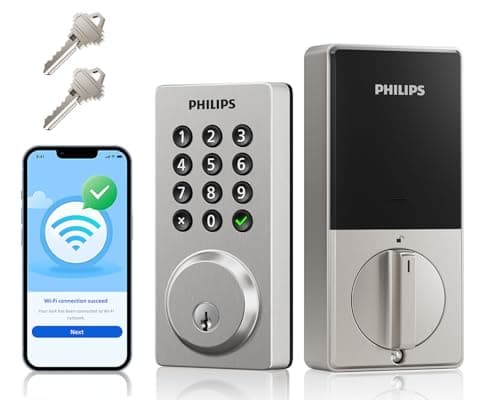
Philips
Philips WiFi Smart Keypad Deadbolt Lock, App Remote Control, No Hub Needed
- Remote Control from Anywhere: The Philips smart lock built-in WiFi that you can connect it directly to your home WiFi network. In addition, you can use the Philips Home Access App to easily control your smart door lock anytime or anywhere: remote control turn it on or off, set access permissions, receive real-time notifications, event historyand more.
- 4 Ways to Unlock: When the Philips smart Lock is paired with Alexa and Google Assistant, you can unlock or lock the door using your voice. Keys, passcode and mobile app can also unlock. The Philips smart deadbolt is designed with physical buttons are simpler and more reliable than touchscreen.
- Multiple Password Modes: You can create up to 100 custom passwords. You can set up permanent, one-time, and timed passwords to assign to family, friends, tenants, and cleaners as needed.
- Security Auto Lock: You can setting the Philips Deadbolt Smart Lock to auto lock within 10-180 seconds by mobile app. Not only does this free your hands, it also keeps your home secure even if when you might forget to lock your door: such as before work or after shopping.
* As an Amazon Associate we earn from qualifying purchases.
This Philips WiFi Smart Keypad Deadbolt Lock emphasizes simplicity and reliability with its physical keypad buttons instead of a touchscreen, built-in WiFi for remote control, and straightforward setup. Supporting voice commands through Alexa and Google Assistant, auto-lock functionality, and up to 100 custom passwords, it's ideal for users who prefer tactile feedback and want a no-nonsense smart lock that just works.
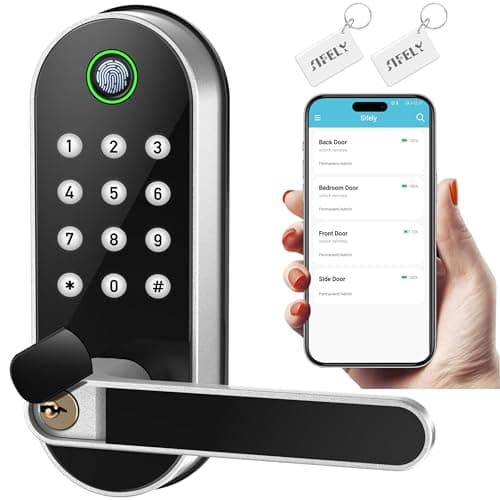
Sifely
Fingerprint Smart Door Lock with Handle & Keypad – No More Lost Keys, Keyless Entry & Remote Access for Home, Kids, Airbnb & Rental Property, DIY Install, Alexa & Google Compatible
- 【Fingerprint & Keyless Entry – Perfect for Families】Unlock with fingerprint, keypad, app, FOB or key. Ideal for kids, parents and elderly users who don’t want to carry physical keys anymore.
- 【Airbnb & Rental Ready】Instantly generate guest access codes via app or web. Remote access logs let hosts manage properties with ease anytime, anywhere.
- 【DIY Install in Minutes】Designed to fit most standard doors with no extra drilling required. Installation takes only a few minutes and the handle is reversible for left & right doors.
- 【Bluetooth App & Remote Access】Use the app to unlock, check access records or manage users anytime. Works with Sifely WiFi Gateway (optional) to unlock the door from anywhere.
* As an Amazon Associate we earn from qualifying purchases.
The Sifely Fingerprint Smart Door Lock with Handle is engineered for families, Airbnb hosts, and rental property managers. Its DIY installation takes minutes, Bluetooth app control works instantly, and optional WiFi Gateway support enables remote access from anywhere. With fingerprint, keypad, app, and FOB unlock methods plus real-time access logs, it's perfectly suited for property managers who need hands-free convenience and transparency.
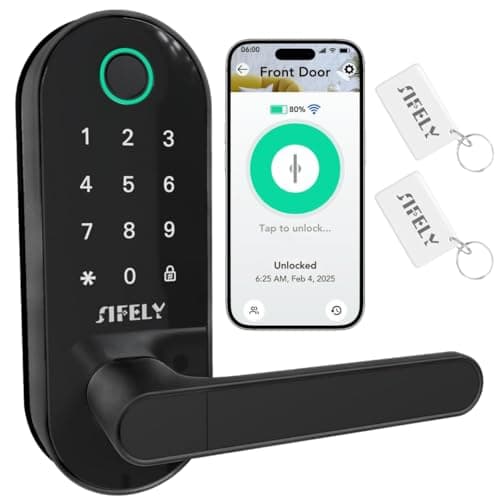
Sifely
Fingerprint Smart Door Lock with Handle & Keypad – Built-in WiFi Remote Access, Keyless Entry for Front Door, Home & Airbnb, App Control, Compatible with Alexa & Google, Easy DIY Install
- 【Built-in WiFi – No Gateway Needed】Control the lock remotely from anywhere using the app without needing a separate WiFi gateway. Ideal for homeowners and rental property managers.
- 【Fast Fingerprint Biometric Unlock】Advanced biometric sensor recognizes your fingerprint in 0.3 seconds for secure and convenient access. Great for families, rentals, and offices.
- 【Strong Deadbolt Security】Heavy-duty deadbolt design provides reliable physical protection for front doors and apartments. Built for long-term home security and daily use.
- 【Smart App & Voice Assistant Control】Create codes, view access logs, and manage users with the app. Works with Amazon Alexa & Google Assistant for hands-free voice control.
* As an Amazon Associate we earn from qualifying purchases.
Another standout from Sifely, this Built-in WiFi model eliminates the need for a separate gateway while delivering 0.3-second fingerprint recognition, multiple unlock methods, and full Alexa and Google Assistant support. The heavy-duty deadbolt design and auto-lock feature provide robust security, making it an excellent option for apartment dwellers and homeowners who want professional-grade protection without the professional-grade installation.
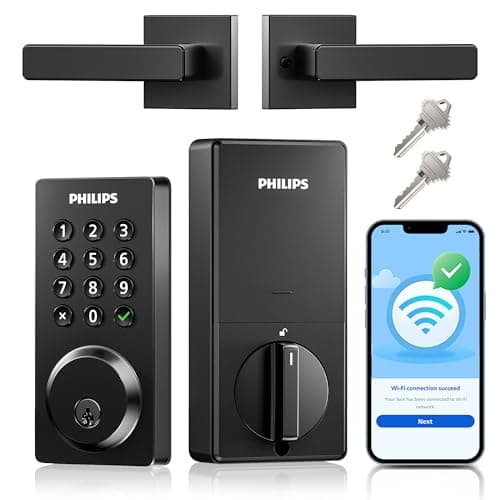
PHILIPS
Philips WiFi Keypad Door Lock with Handle, App Control Smart Deadbolt Lock | 100 User PIN Codes, Anti-Peep Code, Waterproof, Auto Lock, Support Alexa & Google Voice
- Remote Control from Anywhere: The Philips smart lock built-in WiFi that you can connect it directly to your home WiFi network. In addition, you can use the Philips Home Access App to easily control your smart door lock anytime or anywhere: remote control turn it on or off, set access permissions, receive real-time notifications, event historyand more.
- 4 Ways to Unlock: When the Philips smart Lock is paired with Alexa and Google Assistant, you can unlock or lock the door using your voice. Keys, passcode and mobile app can also unlock. The Philips smart deadbolt is designed with physical buttons are simpler and more reliable than touchscreen.
- Multiple Password Modes: You can create up to 100 custom passwords. You can set up permanent, one-time, and timed passwords to assign to family, friends, tenants, and cleaners as needed.
- Security Auto Lock: You can setting the Philips Deadbolt Smart Lock to auto lock within 10-180 seconds by mobile app. Not only does this free your hands, it also keeps your home secure even if when you might forget to lock your door: such as before work or after shopping.
* As an Amazon Associate we earn from qualifying purchases.
The Philips WiFi Smart Door Lock with Handle in Matte Black combines modern aesthetics with practical functionality. IP54 waterproof rating, built-in WiFi, 100 custom password options, 4-way unlock (voice, key, passcode, app), and auto-lock functionality make this a stylish choice for contemporary homes that demand both beauty and brains.
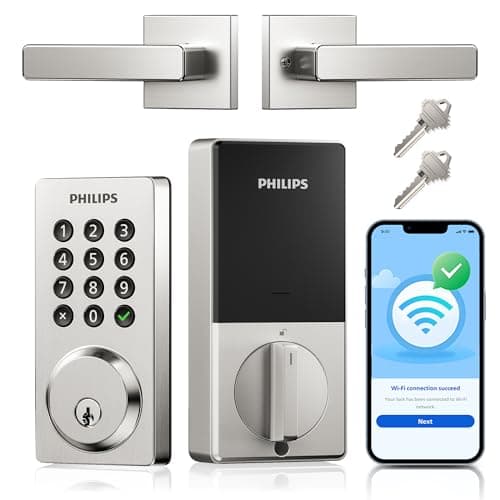
Philips
Philips WiFi Smart Door Lock with Handle, Built-in WiFi App Remote Control, Keyless Entry Door Locks for Front Door, Smart Deadbolt Auto Lock, Support Alexa & Google, IP54 Waterproof, Satin Nickel
- Remote Control from Anywhere: The Philips smart lock built-in WiFi that you can connect it directly to your home WiFi network. In addition, you can use the Philips Home Access App to easily control your smart door lock anytime or anywhere: remote control turn it on or off, set access permissions, receive real-time notifications, event historyand more.
- 4 Ways to Unlock: When the Philips smart Lock is paired with Alexa and Google Assistant, you can unlock or lock the door using your voice. Keys, passcode and mobile app can also unlock. The Philips smart deadbolt is designed with physical buttons are simpler and more reliable than touchscreen.
- Multiple Password Modes: You can create up to 100 custom passwords. You can set up permanent, one-time, and timed passwords to assign to family, friends, tenants, and cleaners as needed.
- Security Auto Lock: You can setting the Philips Deadbolt Smart Lock to auto lock within 10-180 seconds by mobile app. Not only does this free your hands, it also keeps your home secure even if when you might forget to lock your door: such as before work or after shopping.
* As an Amazon Associate we earn from qualifying purchases.
Similar to its matte black counterpart, the Philips WiFi Smart Door Lock with Handle in Satin Nickel offers the same robust feature set—remote WiFi control, Alexa and Google Assistant compatibility, 100 custom passwords, and 6-month battery life—but in a classic satin nickel finish that complements traditional and transitional home designs.
What to Look For in Smart Locks with Remote Access
WiFi Connectivity & Remote Control Capability
The cornerstone of any remote-access smart lock is built-in WiFi or hub-free connectivity. Verify the lock supports 2.4GHz WiFi (most current models do) and can connect directly to your home network. Built-in WiFi eliminates the need for a separate hub or bridge device, reducing setup complexity and cost. Check the manufacturer's documentation for signal range recommendations—typically 65–70 feet for optimal performance. Remote access via the accompanying smartphone app should allow you to lock, unlock, check status, and manage access codes from anywhere.
Voice Assistant Compatibility (Alexa & Google Home)
Confirm the smart lock explicitly states compatibility with both Amazon Alexa and Google Assistant. Voice control convenience means you can unlock your door hands-free, though most manufacturers recommend securing voice unlock behind an additional authentication layer (PIN or recognition requirement) for safety. Test voice commands like "Alexa, unlock my front door" during setup to ensure latency is acceptable. Not all features may be available via voice—typically lock, unlock, and status checks work well, while admin functions like code creation remain app-only.
Multiple Unlock Methods & Key Flexibility
Premium smart locks offer 6-7 different ways to gain entry: fingerprint recognition, passcodes, smartphone app, mechanical keys, voice commands, RFID/FOB cards, and temporary eKey sharing. Fingerprint storage capacity varies (typically 20–50 prints), as does passcode limit (50–100 codes). For families, renters, and property managers, the ability to issue one-time codes or time-limited guest access via app is invaluable. Confirm whether codes can be created and revoked remotely without touching the lock itself.
Battery Life & Power Management
Most smart locks run on 4–8 AA batteries and deliver 3–18 months of runtime depending on daily usage and technology (Thread-enabled locks last longer). Look for models that send low-battery alerts to your app and beep at the door when power is critical. Mechanical key backup is essential—if batteries die, you can still open the door manually. Compare battery specs honestly: high usage (20–30 unlocks daily) will deplete batteries faster than light use.
How to Set Up Smart Locks with Alexa & Google Home Remote Access
Setting up a smart lock with Alexa and Google Home remote access is straightforward but requires attention to detail. First, install the lock hardware according to the manufacturer's instructions—most models take 15–30 minutes with basic tools. Download the lock's companion app (Philips Home Access, ULTRALOQ, Sifely, or Veise) on your smartphone and create an account. Connect the lock to your 2.4GHz home WiFi network via the app; ensure your router is within 65–70 feet for reliable signal. Next, enable the lock's skill or action in the Alexa app or Google Home app, link your lock account, and grant permissions. Test basic controls in the app first (lock, unlock, check status), then add voice commands. For Alexa users, say "Alexa, discover devices" to sync smart locks automatically. For Google Home, navigate to Settings > Home Control and add the lock device. We recommend pairing your smart lock with other smart security devices like video doorbells and motion sensors to create a comprehensive home protection ecosystem. Finally, set up auto-lock features (typically 10–180 seconds after unlock) to ensure your door closes automatically even if you forget.
How Smart Locks with Remote Access Compare to Other Smart Home Upgrades
Smart locks with Alexa and Google Home integration offer exceptional value compared to other smart home investments. A quality WiFi-enabled smart lock typically costs $150–$400 and eliminates the need for physical keys, supports unlimited guest access codes, and provides real-time door activity logs—benefits that competitive smart home solutions cannot match at the same price point. While smart lighting systems enhance ambiance and energy savings, they don't improve home security; smart locks do both. Similarly, smart thermostats optimize comfort but lack the access control and remote entry capabilities that smart locks provide. For renters and property managers, smart locks are arguably the highest-ROI smart home device available, as temporary guest codes eliminate physical key exchanges and reduce lock-rekeying costs. If you're building a comprehensive home automation system, prioritize smart locks first—they're the gateway to everything else.
Our Verdict
Smart locks with Alexa and Google Home remote access have become essential for modern homes. If you prioritize future-proof technology and don't mind spending more, the ULTRALOQ Bolt SE delivers unmatched features: Matter support, 18-month battery life, 7-in-1 entry methods, and universal voice control. For budget-conscious homeowners and families, the Philips WiFi Door Lock or Veise VE012W offer excellent performance, no-hub simplicity, and all the remote access and voice control you need. Property managers should consider the Sifely models for their intuitive guest code management and built-in WiFi. Choose based on your aesthetic preference (keypad vs. handle style), unlock method priorities, and budget—all top-ranked models here will deliver years of secure, convenient access.
Frequently Asked Questions
Do I need a WiFi router close to my smart lock for remote access to work?
Yes, your WiFi router must be within 65–70 feet of the smart lock for reliable connection. The lock communicates with your router during setup and whenever remote commands are sent. If your lock loses WiFi connection, you can still unlock via fingerprint, passcode, or mechanical key at the door, but remote app access won't function until connectivity is restored.
Can I unlock my smart lock with Alexa or Google Assistant from outside my home network?
Yes, all smart locks featured here support remote unlock via Alexa and Google Assistant from anywhere, provided your lock is connected to WiFi and your account is properly linked in the Alexa or Google Home app. Voice unlock typically requires you to repeat a PIN or confirm via app notification for security.
How many guest access codes can I create, and can I set expiration dates?
Most models support 50–100 custom passcodes. Most allow you to create permanent codes, one-time codes (single use only), and time-limited codes (active for a specific date range). You can create, modify, and delete codes entirely through the smartphone app without touching the lock itself, making remote guest management seamless.
What happens if my smart lock batteries die?
When batteries are critically low, the lock will beep and send you an app notification. You can still unlock the door using your mechanical key or, on some models, an external USB power bank connected to the lock's emergency port. Most locks last 3–18 months per battery set depending on daily usage; monitor app alerts and replace batteries proactively.
Is voice unlock secure, or could someone else unlock my door?
Voice unlock is reasonably secure because most smart locks require confirmation (e.g., "Unlock the front door, confirm with PIN 1234"). This prevents strangers or other household members from casually triggering unlock commands. For maximum security, disable voice unlock from Alexa/Google and use only in-app or physical methods; the choice is yours through lock settings.